Friday, 18 November 2016

5 Reasons WHY you SHOULD Maintain Your Computer (Shared)

Many of us (no matter personal or business owner) will never have the habit of maintaining their computer most of the time.

When should we maintain our Computer?
When System BREAKDOWN?
When Software ERROR?
When Hardware SPOILED?
When The Computer CANNOT TURN ON?


When you or your company faced this kind of problem... It might be a little TOO LATE... Instead of spending a few hundred, you would have to spend a few thousands here and a few thousands to get your data recovered. And down time cost with lost of businesses. Hardware or Software BREAKDOWN will caused a lot of things we never expected. The most common case we know like losses of DATA

Let's us share with you WHY you need to Maintain your Computer Frequently.

1. Productivity 

When you don't maintain your computer, every day you use your computer, junk accumulates, unnecessary and unwanted programs and services load into memory or potentially a virus is creeping on your hard drive. Only through regular maintenance can your computer run the same as when you first purchased it.

The first impact is your productivity. We have all seen it in real life. When talking to customer service on telephone, how often must they apologize because you are both on waiting on a response from their computer? This happens to all of us and our productivity suffers.

2. Frustration

Without proper maintenance, your computers get slower still and pure frustration becomes in set in. Working on your computer has become a chore, and you start pricing out new computers. When you don't get all your work done, you blame your computer rather than the lack of maintenance for that same computer.

3. Data Loss

It doesn't happen to everyone, but when it does it can be catastrophic. As your un-maintained computer goes down the rabbit hole, it can also become unstable, sometimes freezing, or requiring a reboot to restore normal operation. During these time, frequently your work is lost and you have to start all over again. It really never should get this far but often it does. Some critical cases where your Hard Disk stopped working and without backup, all your data is lost. Best case scenario, recovery is possible. Worst case scenario it's not recoverable.

4. Asset Management

Your computer is just like your car, an essential part of your life, that greatly impacts your life, productivity and happiness. We all know that we need to take care of our cars. It is generally accepted that we should rotate the tires, change the oil and check other fluid levels. At the very least, we throw out all the trash that has accumulated and perhaps vacuum the inside and the trunk. That's because we know that if we take care of our car, it will take care of us.

The same simple concepts apply just as well to your computer. Proper maintenance can add years of longevity to your computer as well as reducing frustration and stress.

5. Getting a new computer


Aside from the experience of a new computer, there is also trials and tribulations of getting your new computer to run like new one. Configuring windows, and downloading and configuring all of your applications, can take multiple weeks. It is best just keeping your old computer running just like you wanted.


为什么你需要经常保养你的电脑?(分享)

大部分的人(包括个人或者企业家)都没有定期保养电脑的习惯。

那通常在什么情况下才会恍然大悟的觉得自己其实应该养成这种习惯?
- 当系统无法操作的时候?
- 当软件无法运作的时候?
- 当硬件损坏的时候?
- 当电脑无法开机的时候?


当你的电脑面对以上的问题时,做什么都于事无补了。 除了要支付昂贵的维修费以外,还要面对数据丢失、公司无法正常运作的风险。 你无法预算得到软件和硬件的损坏所带来的影响,我们最常见的影响就是公司重要的数据全部遗失.

让我们和你分享定期保养电脑有什么好处吧!

1. 生产率


一部电脑除了帮你处理日常运作以外,在同时间你的电脑也累积了一些不必要的垃圾、和不需要的程序,除此以外,我们日常浏览的网页和文件中潜伏的病毒也会隐藏在我们的电脑里。

你有体验过这样的情景吗?但你拨电话给客服专线的时候,最常听到他们向你道歉,说他们的系统很慢,或者电脑需要时间来操作。那试想一下,如果你的客户拨电话给你的时候也遇到这样的问题呢?

2. 焦虑、不耐烦


当你很急需利用你的电脑处理一些客服要求的时候,换来的却是需要时间慢慢的等待系统操作,而客户又一直在催促你,这个时候不耐烦的情绪就会出现,如果平时做足电脑保养工作,就会少了很多这样的问题,客户也会满意你的服务,这也可以帮你得到更多的生意。

3. 数据丢失

也许这不会发生在每一架电脑,当时一旦数据丢失发生的时候,所带来的损害绝对不会只是替换软件、硬件甚至是电脑那么简单。现在的公司都习惯把重要、不重要、日常使用的数据收藏在电脑的硬件里,没有保养的电脑就会存在这个危机,一旦所有数据丢失,幸运的也许可以靠专业人士的帮忙,回复你的数据。不幸运的,你丢失的数据可能也是你所有客户的资料。


4. 资产管理


每个人都知道,车子的保养很重要,因为有了适当的保养,车子才可以保障你的安危。电脑的保养也一样,数据就像是一家公司的资产,当你丢失了数据也就代表着你丢失了你的资产。因为数据里面可能有你所有客户的资料,他们购买过的产品。如果定时的保养可以确保你的数据不会流失,何乐而不为呢?

5. 节省成本

也许你觉得换了新电脑就可以解决问题,但是新的电脑意味着什么呢?新的电脑意味着你必须从新安装、迁移你的数据。即费钱、费时又费力。而且若没有对新的电脑进行适当的保养,你只会一直重复的做一样的事情。良好保养的电脑除了让延长你的电脑的寿命以外,最重要的是你不需要费时费力去安装和迁移你的数据。


Tuesday, 15 November 2016

送给所有渴望成功,并在创业路上坚持不懈的所有同仁(分享)

为什么你成功又是什么?


要怎样才算拥有财富?你究竟多渴望财富


 有人选择打工, 用珍贵的时间换来金钱


当他们迈出这一步,已注定一辈子碌碌无为 

 有人选择了创业


打工者说:等有钱了,再创业吧!
创业者说:我就是因为没钱,才会创业

强者不是没有眼泪,只是含着眼泪依然在奔跑... 


如果不坚持,到哪里都是放弃... 


只有做不成事的人没有做不成的事

万事开头难,当你上路了,你才有资格,说自己不行!


使我痛苦者,必使我强大


你必须非常努力,才能看起来毫不费力

有人工作了10年,只是把1年的工作经验重复使用了10年... 

当你辛苦想选择放弃的那一刻,想想当初为什么走到这里来... 

很多事情,坚持坚持就成功了!

人生没有太多的时间可以浪费... 

一个人,一辈子,坚持做好一件事.... 


李嘉诚写在自己办公室的九句话(分享)

不为模糊不清的未来担忧,只为清清楚楚的现在努力


只有先改变自己的态度,才能改变人生的高度


在抱怨自己赚钱少之前,先努力,学着让自己值钱


学历代表过去,学习能力才代表将来


耐得住寂寞才能守得住繁华,该奋斗的年龄不要选择了安逸


有些事情不是看到希望才去坚持,而是坚持了才看得到希望


压力不是有人比你努力,而是比你牛的几倍的人依然在努力


你所做的事情,也许暂时看不到成功,但不要灰心,你不是没有成长,而是在扎根


现实和理想之间,不变的是跋涉;暗淡与辉煌之间,不变的是开拓


设计良好的网页对SEO和用户的帮助(分享)


虽然网页设计一直被视为一项艺术工作,但是它的意义和贡献远非如此。一个设计良好的网页可以对于提升SEO、促进交易、提高用户粘度等都有很大的帮助。而得益于网页设计技术的发展,小公司现在有越来越多的机会来改进自己的网页设计。

一个设计良好的网页对于业务的影响包括下面这些:

1. 平均游览时间更长

大家都希望用户在自己的网页上提留更长的时间。这通常意味着用户的粘度更高、交易完成度越好。而良好的网页设计就能让用户在页面上停留更长的时间。

2. 品牌

作为一个公司来说,如果你能够吸引热情的买家,那么你的工作就完成了。一个好办法就是通过优秀的网页设计突出你的品牌形象。

3. 一致性

以本质来说,消费者对于好产品的要求就是一致性。比如麦当劳在全球卖出的汉堡基本上就是一个味道。与此类似好的网页设计,能保证公司品牌形象的一致性。

4. 可规模化

眼下你的网站运转正常,但是3年以后呢?好质量的网页设计就能保证可规模化的能力。业务的迅速发展意味着网站也要同步的跟上。如果起初对于这些细节的关注不够,那么之后必然要推倒重来。

5. 增加曝光率

如果你的网页设计足够好,它就会被添入一些设计师的收藏中。这样就能为你的网站带来更多的流量。

6. 跨浏览器的兼容

每个人都有自己偏好的浏览器。有人喜欢谷歌Chrome、有人喜欢Safari、有人依旧使用IE。一个设计良好的网页可以让你的网站跨浏览器使用。

7. 降低维护成本

在商业社会,维护的时间就是损失的时间。一旦你的网站挂掉,你的曝光率销售额必然会受到影响。一个高质量的网站可以将维护的成本降到最低。

8. 可分享性

好的网页要很容易被分享。这样用户可以向他们的同事和朋友推荐这个网站。而且这样做还能增加品牌的可接触性,提高在用户中的存在感。

9. 搜索引擎的友好

虽然最终的判断是由用户来决定的,但是高质量的网页设计会影响你的网站在搜索引擎中的排名。而且谷歌实际上会采用人工的方式,对各个网站的用户体验进行评分。

总之,一个好的网页设计对于业务好处多多。所以如果你打算建站,那么从这些方面考虑那还是很有必要的。而最新的技术能够让你和网页公司之间的沟通更加的流畅。网站设计的影响会超出你的想象的。不要让一个糟糕的设计影响到你的业务发展。

Why Do You Need A WEBSITE?? (Shared)

Late Steve Jobs also asked "WHY". He challenged every single operation within his company. Everyone, from the engineers to the accounting staff, did things differently, because Late Jobs would ask them why they did things in a certain way. 

And answering, "Well, that's what everybody else is going" simply wasn't good enough. 

When you started your first business, the first thing you should ask yourself is: "Do I need to get a WEBSITE?". 


If you are still confusing about is it a NEED to get a WEBSITE, here's some reasons to tell you why YOU need a WEBSITE. 

REASON #1
ONLINE BROCHURE


Companies spend millions creating brochure and distributing them. By having a website you can skip that entirely. Your potential customers can find out about you and any of your products online. If you get most of your business through networking and personal connections, then they will want to check out you website. 

REASON #2
MORE CUSTOMERS

More than 2.4 billion people use the internet every day, and some 90% of those have purchased something, or contacted a company, online in the last 12 months. So by not having a website, you will be missing out on a big piece of the pie. 

REASON #3
BUSINESS VALUE

Have you tried getting a business plan recently? It's not easy, but if you try the bank manager asks to see your website, you better have a pretty good one. It doesn't just stop with the bank, the perceived value of your business will be lower in everyone's eyes - especially your customers. 

REASON #4
INFLUENCE

By having a website potentially thousands of people are going to see it. You are able to influence people's decisions and educate them.

REASON #5
TIME TO SHOW OFF

You know that great feeling you get when people recognize your work? Well, by having a website you can show off what you do and take pride in your work. 

REASON #6
HELPS WITH BUSINESS GOALS

That's right! When it comes to writing the content for your website you are going to revisit things about your business that you haven't in years. You will most likely reassess your business goals. 

REASON #7
24 HOURS PER DAY

Your website runs 24/7 without any supervision or need to lock it up. You can always be there for your customers. 

REASON #8 
COMMUNICATION WITH CUSTOMERS

By having a blog or even just a feed on your website, you can update customers on your newest offers, products, promotions, events, photos, or any other content. 

REASON #9
MARKETING


The internet has opened up a whole new world of marketing that didn't exist before. Your website can attract new business by using a whole host of low cost marketing techniques. 

REASON #10
CUSTOMER SUPPORT

You can greatly reduce the cost of customer support by have a ticketing system, or even just an FAQ on your website. Customers can think of about 5 companies off the top of their head that streamline your customer service straight away from your website. 

REASON #11
EMAIL@MYWEBSITE.COM

There are other ways to do this, but by having a website you can have your own email address@whateveryouwant.com. It is more professional and easier to remember. blahblahblah@gmail or yahoo.com is great, but it doesn't really resonate with customers. 

REASON #12
PRESS RELEASE

That sounds a bit far out, but it is true. You can run really cheap press release online about your business, bu to do i you will require a website. In fact, some clients who were absolute nobodies get one million views on YOUTUBE because of online press release. 

REASON #13
STICK IT TO THE MAN

The best answer to "Why do I need a Website?" would be that you can stick it to the man. It is the easiest way to quit your job and earn a living. 

REASON #14
ANY TOPIC OR HOBBY WILL DO

Do you love sports? How about ballet, alternative dance, photography, holiday, Kit-Kats, cars, skateboards, science or animals? Well, then you have a business idea just waiting to happen. The internet has room for an unlimited number of niche blogs that can attract traffic and revenue. Just pick something you love and start writing about it. 

REASON #15
CONNECT WITH FELLOW WEB MASTERS

On a little side note, if you own a website you get to call yourself a "web master". Pretty Cool! But Reason #15 for "Why I need a website" is that you can easily make new business and personal connections with other website owners. This can lead to extra streams of income for you!

REASON #16
GIVES YOU A VOICE

Have you ever been in an argument with someone and said "well, I have written an article about that on my website, and actually, that isn't the case". It feels great! For some reason people don't want to argue with you if you've written about something on your website. It also gives you a place where you can voice your opinion without judgement. If someone leaves you a comment you don't like you can just drag it over to the spam folder. 

REASON #17
DO BUSINESS YOUR OWN WAY

You don't need permission from your boss or company lawyer. Ash Ambridge drops the F-Bomb all the time because she can, and no else is asking her to stop. Now she has a world class business with thousands of customers. 

REASON #18
BEAT THE BIG GUYS

Have you ever wanted to get into business, but don't know how to compete with all the big names out there? By creating an incredibly beautiful website with a solid strategy behind it you can smash the big guys to pieces. You have no chance of building bigger skyscrapers, but your website can break down the perceived wall between you and them. 

REASON #19
INSTANT CREDIBILITY

Have you ever had difficulty make that sale? Or convincing someone that you are the real deal. By having a well structured website you can foster instant credibility with anyone. You can provide the ultimate proof that you are, in fact, the realest of all deals (couldn't resist the phrase). 

REASON #20
HELPS YOU TO FIND A NEW JOB

Maybe you didn't see this one coming. Not only can a website host your resume or CV, but by owning and managing your website you have demonstrated tons of hard and soft skills.

So.... WHY DO YOU NEED A WEBSITE?? 

Can you think of a couple of reasons why you shouldn't? It wouldn't be a balanced argument if you don't... 


Monday, 14 November 2016

跟这15种人交朋友,想不成功都难 (分享)


社会中,每个人都在努力奋斗。可是,有的人成功了,获得了巨量财富;有的人却始终没有摆脱贫穷的面貌。原因不复杂,只因为财富也是长着“势利眼”的,它喜欢那些勤奋努力、有创新、有目标的人。总结起来,财富最喜欢以下这些人:

【不满现状的人】

如果你以习惯朝九晚五的上班族生活,整天上班、下班,日复一日,任凭岁月消逝,你一定成不了富翁。一个积极想要赚钱的人,绝不以温饱为满足,一定想要让生活多姿多彩,天天充满赚钱的活力。具备了这个要素,再坏的天气,再苦的工作,你也会心甘情愿的去做。而当你养成了这个赚钱的“习惯”后,财富自然越来越多。

【穷怕的人】

社会上的大富翁,出身背景往往呈现两极化,不是继承祖业的企业家二代,就是从小贫困、白手起家的创业者,而后者的能力和累积的财富持久力大多优于前者。这充分说明,一个生长在贫穷家庭的小孩子,因为穷怕了,所有有着比一般人更强烈的赚钱欲望。

【爱动的人】

一般人想要赚钱,也一定要勤于“动”,不管你是一个小业务员还是修车技术员,平常勤于与人“互动”,让人际关系活跃起来,赚钱的机会自然较多。在“动”的过程中,要特别记住不要害羞,不要怕没面子。要大胆、乐观地试试看,这尝试的过程,不仅让你体会人生百态,也让你领悟赚钱的方法。

【效率高的人】


在这种生活节奏很快的社会,在上下班高峰期,到车站里瞧一瞧,就会发现,每个人的脚步都那么急匆匆,每个人都在赶路,看上去非常急。确实,要想在这个社会赚钱,就要有非常高的办事效率才可以。

【有自信心的人】


大凡在社会打拼的人都知道,工作中有无信心十分重要。一个对自己已有全盘信心的人,就能潇洒的调度自如,可大可小,可松可紧,能在非常时期有非常办法应付。

【充满好奇心的人】

好奇心是人类生活进步的原动力,是一种创造力,也是一种魄力,有了这种魄力就会去做投资、冒险,而这种行为正是致富的主要原因之一。

【有人生目标的人】

谁都想赚钱,可是,你对未来的财富人生做好规划了吗?当我们闭上眼睛去设想未来,可能许多华美的图画齐齐掠过脑海。分析成功者的足迹,我们不难发现,建立一个正确、切实可行的目标,并为了这个目标的实现而不断努力奋斗是非常重要的。

【果断勇敢的人】

果断性强的人,当需要立即行动时,能迅速的做出决断对策,使意志行动顺利进行;而当情况发生新的变化,需要改变行动时,能够随机应变,毫不犹豫的做出新的决定。生意场上,需要的正是果断勇敢的人。

【善于总结的人】

如果在社会中不学习,最终生意不会做长久。急剧的全球性转变,资讯光速流转,机会转瞬即逝。环境的迅速变化确实向任何人都提出了新的挑战 - 凡是依赖于旧有的知识和依循以往的方式解决问题,终将无法避免淘汰的命运。

【珍惜时间的人】


很多在社会中拼的人都有这样的同感,每天24小时根本不够用,恨不得变成48小时。是的,时间是宝贵的,又是无情的,它总是不声不响地从我们身边匆匆流逝。能抓住时间并刻苦学习的人就能成为有用之才。而不能抓住时间的人,只会白了少年头,空悲切。

【心态好的人】

有人说,心态决定命运,心态表示一个人的精神状态,一个人的心态,对他的人生成长与发展会有很大的影响。好的心态不但可以让人更好取得成功,还能更好的享受生活,提高你的幸福程度。

【吃苦耐劳的人】

“吃不了苦”是时下一些年轻人的一种通病,他们总是对目前的工作感到不满,总想找一个即轻松又能赚大钱的工作。结果往往是好事没有降临,宝贵的年华却虚度了。

【不断进取的人】

浅尝辄止、安于现状、不思进取的人不会做出什么大成绩。一个有崇高目标、期望成就大业的人,总是不停地超越自我,拓宽思路,扩宽知识,敞开生活之门,希望比周围的人走得更远。这样的人,不愁赚不到钱。

【善于抓住机遇的人】

“聪明人制造的机会永远比得到的多” 培根告诉人们的是以自身努力为前提的成功定律 - 只要你能不失时机地充实自己,提高自己,就能成就自己,抓住机遇!每天的机遇都很多,您要想赚钱,那就时刻武装自己吧,总有一天,机遇会降临您身上

【坚持不懈的人】

坚持,是一种过程,一个持续的过程。想成一事,必从小事开始,积少成多,正所谓:不积跬步,无以至千里;不积小流,无以成江海。有些人,做事是怕别人说失败,为不失败而坚持。有些人做事,为了成功,为了成功的目标而坚持。


5 Commonly Misused Phrases In Emails (Shared)


Usage of "Noted with Thanks"

If you say that something is "Noted with..." you would be referring to the method which it was noted. So you can note something with your pen, or you can note something in your iPad or whatsoever, but you cannot note something with "thanks"

What you can use instead:

1. Thank you for your information.

2. Thanks for the update

Both of the above thank the reader and tell them that you have received and read the information in a much more natural (and correct) way.

Usage of "Well Received"

"Your email was well received" is a commonly misused phase. To be "well received", it means getting a reaction or positive feedback from people.

For example, if a person conducted a presentation, and the evaluation forms were good, it would mean the program was "well received" by the people if you say this about an email, it means that everyone in the office liked your email.

What you can use instead:

"Thank you for your email"

Usage of "with regards to"

This is another commonly misused phrase. You can only send your regards to the recipient but you can't refer to something or a matter.

What you can use instead:

1. I would like to bring up a matter with regards to"

2. I would like to bring up a matter regarding..."

Usage of "Deadline" and "Dateline"

"Deadline" refers to the date or time a task needs to be completed

"Dateline" refers to a line in a newspaper article that gives the date and the place of origin.

Usage of "I hope this email finds you well"

This is an awkward phrasing even through it's commonly used at the beginning of business emails. It would be good to vary your beginning sentence if you write to someone often as well. A repeated opening sentence could come across as a habit rather than a sincere sentiment.

What you can use instead:

1. We hope you are enjoying the season

2. I hope all is well

3. I hope you are well / fine

4. It's a pleasure to be in touch with you again


How many of you still using "NOTED WITH THANKS"???

How to Manage your Emails Effectively so It won't Overloaded (Shared)


Story: It's Monday morning. As Linda sits down at her desk she experiences that familiar sinking sensation in her stomach... She's not dreading the day ahead of her - she's dreading her email inbox! 

DID YOU FACE THE SAME PROBLEM LIKE LINDA???  

E-Mail (electronic mail) is the exchange of computer-stored messages by telecommunication. E-mail (or some publications spell it email) messages are usually encoded in ASCII text. However, you can also send non-text files, such as graphic images and sound files, as attachments sent in binary streams. E-mail was one of the first uses of the internet and is still the most popular use. A large percentage of the total traffic over the internet is e-mail. E-mail can also be exchanged between online service provider users and in networks other than internet, both public and private. 

E-mail can be distributed to lists of people as well as to individuals. A shared distribution list can be managed by using an e-mail reflector. Some mailing lists allow you to subscribe by sending  a request to the mailing list administrator. A mailing list that is administrated automatically is called a list server. 

E-mail is one of the protocols included with the Transport Control Protocol / Internet Protocol (TCP/IP) suite of protocols. A popular protocol for sending e-mail is Simple Mail Transfer Protocol and a popular protocol for receiving it is POP3. Both Netscape and Microsoft include an e-mail utility with their Web browsers. 

 HOW TO MANAGE YOUR EMAIL EFFECTIVELY???

Checking Email


Checking your email regularly during the day can be an effective way to keep your inbox at manageable levels. However, the constant interruption and distraction that comes from multitasking in this way can dramatically lower your productivity, and disrupt your ability to enter a state of flow when working on high value projects. 

One strategic you can use is to check email only at set points during the day. For instance, you may decide that you'll only check your email first thing in the morning, before lunch, and at the end of the day. 

It helps to set your email software to "receive" messages only at certain times, so that you're not distracted by incoming messages. If you can't do this, at least make sure you turn off audible and visual alerts. 

You can also reserve time to read and respond to email after a long period of focused work, or at the time of day when your energy and creativity are at their lowest (this means that you can do higher value work at other times). 

If you concerned that your colleagues, boss or clients will be annoyed or confused that you're not responding to their email quickly, explain that you only check email at certain times, and that they can call you or use instant messaging if the matter is really urgent. 

Reading Email

When you read email, you can waste hours if you don't use this time intelligently. 

First, try using the "Two-Minute Rule" when you read your mail - if the email will take less than two minutes to read and reply to, then take care of it right now, even if it's not a high priority. The idea behind this is that if it takes less than two minutes to action, it takes longer to read and then store the task away "to do later" than it would to just take care of the task now. 

For emails that will take longer than two minutes to read or respond to, schedule time on your calendar, or add this as an action on your TO-DO list, to do later. Most email programs allow you to highlight, flag, or star messages that need a response, so utilize this handy feature whenever you can. 


Organizing Email


Can you imagine having an inbox with nothing in it? It almost sounds too good to be true!

Although a completely empty inbox (also called "inbox zero") might be unrealistic for many of us, keeping our main inbox cleared can make us more organized, and help eliminate stress. 

First, set up a simple filing system to help manage your mail. 

You could use broad categories titled "Action items", "Waiting", "Reference" and "Archives". If you're able to stay on top of your folders - particularly "Action" and "Waiting" folders - you could use them as an informal To-Do list for the day. 

If four categories sound too simplistic for your needs, you can set up a more detailed system. For instance, you could create a folder for every project that you're working on, or have a set folder for each of your clients or sales reps. 

The advantage when you create specific folders for processing email is that it makes it easier to search for past mail: instead of scouring your entire email system, you can simply search in that particular folder. 


Using Rules

Most email programs, such as Outlook and Gmail, allow you to establish "Rules" that sort email into a particular folder as soon as it comes in. 

For Instance, you might get several emails per day that notify you of sales that your company has made. You want to receive these, because you want to see what's happening, but you don't want them to clutter your inbox. 

This is where you could set up a rule in your email program that moves emails with, say, "Sales Notification:" in the subject line straight to the "Sales Made" folder as soon as they come in. This means that you don't need to manually file these emails, and allows you to keep all of the sales emails in one folder. 


Non-Essential Email

If you regularly receive email such as newletters, blogs and article feeds, you could re-route these to another email address or use rules, so that they're instantly delivered to a particular folder. 

This will help keep your primary inbox clear, and they'll be in one place, ready to read a a convenient time. 


Good Team Habits

One of the best things that you can do, to limit the amount of email you need to process, is encourage people to send you less. 

For instance, if certain team members regularly send you long, drawn-out emails, let them know. Tell them gently but firmly that because of the demand on your time, you'd appreciate emails no longer than a paragraph or two. Anything longer than that should warrant a phone call. Alternatively, they could drop by your office for a discussion. 

Also, promote good email and communication strategies in your organization - encourage people to use other instant messaging apps instead of long email. 


Unsubscribe from things you don't read (Ruthlessly)


In your cruising around the web, you probably sign up for a fair share of newsletters and feeds on impulse which you lose interest in afterward. If you find yourself repeatedly deleting the mail from your subscriptions, it's a cue that you should just unsubscribe immediately. 


Maybe the tips above doesn't applied to everyone, but with a knowledge in how to manage your email inbox, you can simply organized and manage your overloaded email so they won't manage you. 


Thursday, 10 November 2016

Network-Attached Storage (中文版)

Network-Attached Storage (NAS)


网络附加存储Network Attached StorageNAS),是一种专门的数据存储技术的名称,它可以直接连接在电脑网络上面,对异质网络用户提供了集中式数据访问服务


NAS和传统的文件存储设备不同的地方,在于NAS设备上的操作系统和软件只提供了数据存储、数据访问、以及相关的关系功能。此外,NAS设备也提供了不止一种文件传输协议。NAS系统通常有一个以上的硬盘,而且和传统的文件服务器一样,通常会把它们组成RAID来提供服务。有了NAS以后,网络上的其他服务器可以不必再兼任文件服务器的功能。NAS的形式很多样化,可以是一个大量生存的输入式设备,也可以在一般的电脑上运行NAS的软件。


使用NAS的优点


1.添加存储空间
更多人选择为他们的家庭或办公室添加网络连接服务器的主要原因之一是为他们的日常操作的电脑添加更多存储。 NAS服务器的存储容量范围从100-250千兆字节(GB),一直到8或更多兆兆字节(TB)。 有了这个广泛的存储选项,几乎任何需求都可以满足,从庞大的程序或视频文件的存储为一群人,或只是创建一个中央服务器,给多个用户一点额外的硬盘驱动器空间。存储空间很重要,特别是对于那些考虑他们未来需求的人来说,NAS服务器就可以帮他们解决他们所需要的。这是一种更有效的方式为人们提供存储,并且不需要为网络上的每台计算机购买额外的单独硬盘驱动器。
 
2.高效的数据传输和可靠的网络访问

网络连接服务器为连接到它的计算机区域或组提供了高效数据传输的方法,并且还确保可靠的网络访问。 如果一台计算机死机或意外中断,NAS将继续运行,并仍允许网络上的其他计算机访问共享数据。 此外,NAS服务器为一组计算机创建了一个中心枢纽,允许人们很少或没有努力地共享文件夹和大文件。 只需将大小相同的文件拖放到共享网络文件夹中,将允许连接到网络服务器的任何其他计算机访问该数据。 一个共享网络中的计算机可以无线或通过以太网电缆连接到主NAS服务器。 这可以改变传输数据的速度。 此外,增加的存储空间和数据的划分可以向计算机网络增加总体速度,这是另一个大的好处。
 
3.方便容易可以从多个不同位置访问

沿着传输数据的相同线路,网络连接服务器使信息和文件可从多个不同的位置访问。 这在小型办公环境中非常有效和有用,当多个人需要查阅单个文档,或者甚至作为团队进行编辑时。通过IP的连接,让你随时随地可以更方便快速的连接你的服务器。
 
4.共享能力

许多房主考虑在家中实施网络连接服务器的原因之一是从房间到房间共享娱乐能力。 如果家中的一个人在他们的计算机上有CD,但他们想在客厅的家庭计算机上收听它,则NAS服务器允许这种功能。 这种相同的能力适用于彼此分享视频,或者在一个房间中观看源自另一房间中的计算机上的文件的电影。 创建一个中心,多个人可以访问和共享媒体文件,如音乐,电影,图像等,是任何家庭娱乐设置的有效的补充。 NAS服务器还允许一个家庭中的一群人访问一个游戏,因此对于那些想要与一群访问的朋友参与在线游戏的人,NAS服务器将允许他们共享他们的游戏体验。
 
5.保护小数据网络

NAS服务器具有加密软件,并且是保护较小数据网络的好方法,因为它们比一般计算机更难以破坏。 此外,存储在网络连接服务器上的任何东西都不仅可以防止外部攻击,还可以防止计算机中的文件损坏或硬件故障。 如果计算机掉落或有水溢出,计算机上的数据将不会丢失,因为它已被安全地存储在NAS上。 虽然外部计算机可以操作文件,但文件本身存储在NAS上,而不是外部计算机上。
 
6.自动备份文件

许多NAS服务器配置允许自动备份文件。 复制的文件夹可以存在于单个计算机和服务器硬盘驱动器上,并且当文件夹中的单个文件在计算机上更改时,也可以在服务器硬盘驱动器上更改副本。 这可以通过连接以太网电缆,或在一些情况下也可以无线地进行。 文件的自动备份是拥有NAS服务器的一个巨大好处,并增加了大量的功能,安全性和安心。 这个想法与前面的步骤一样,但是是一个重要的区别,因为几乎没有提供自动备份功能的外部存储器选项,也没有一个实现在一个位置的许多不同计算机的网络中自动备份文件。

7.简易的快速配置

许多消费者喜欢网络连接服务器的主要优点之一是,不需要太复杂的设置。 即使它们似乎是复杂的,并且不同于平均计算机用户过去参与的任何东西,它们是相当简单的配置和使用。 大多数NAS服务器没有自己的屏幕或键盘,大多数NAS服务器通过在线的基于Web浏览器的软件应用程序进行设置和管理。 这允许服务器的用户配置诸如运行时间,电源使用,带宽使用,密码保护,加密,允许的用户等等。

Network-Attached Storage (NAS) (Shared)


What is Network-Attached Storage?


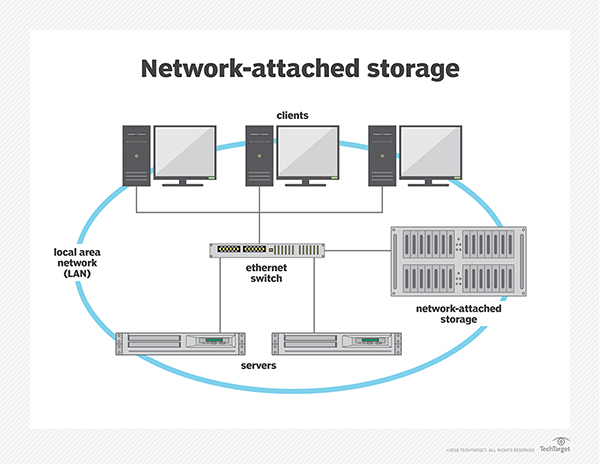
Network-Attached Storage (NAS) is a type of dedicated file storage device that provides local-area network (LAN) nodes with file-based shared storage through a standard Ethernet connection. 


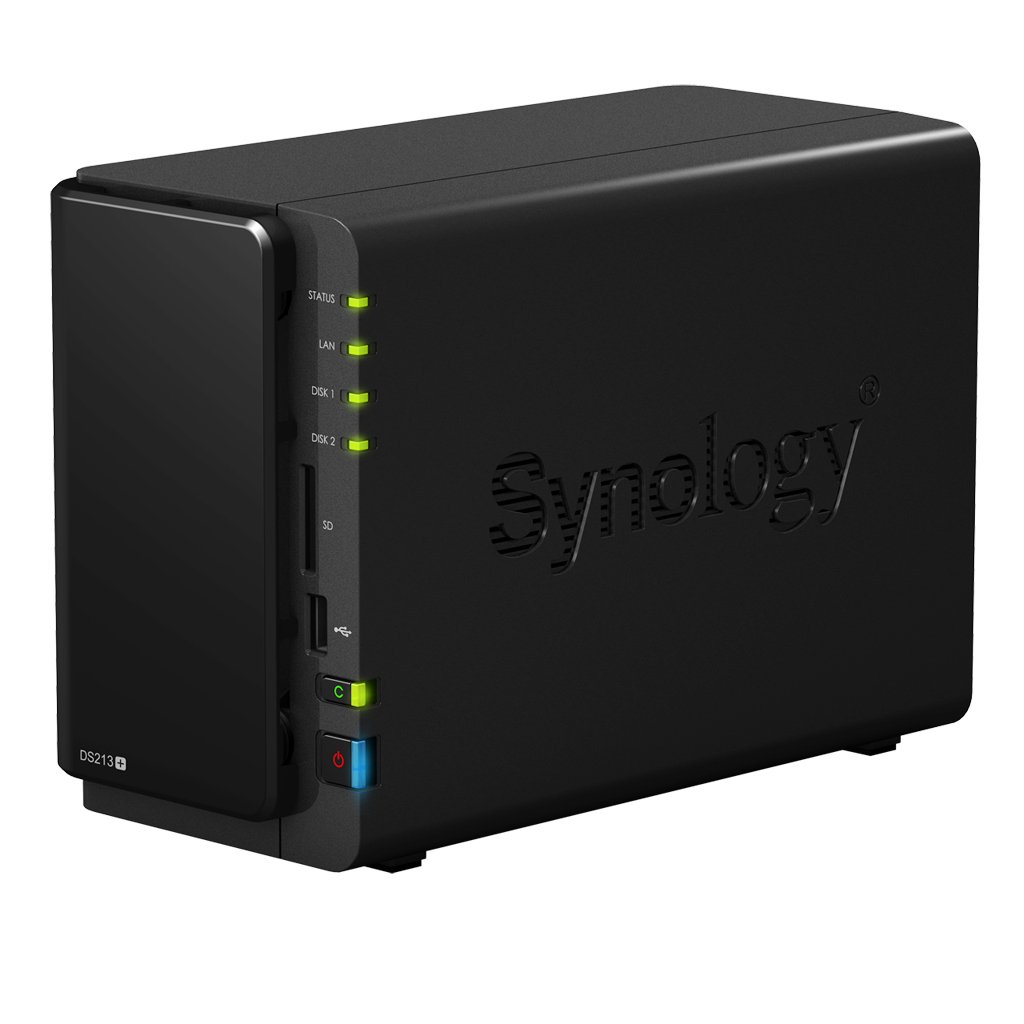
NAS devices, which typically do not have a keyboard or display, are configured and managed with a browser-based utility program. Each NAS resides on the LAN as an independent Network node and has its own IP address.

7 BENEFIT OF OWNING AN NAS SERVER


1. Adding Storage Space


One of the primary reasons people choose to add a Network Attached Server to their home or office is to simply add more storage to their computer's capacity. NAS servers can range in storage capacity from 100-250 gigabytes (GB), all the way up to 8 or more terabytes (TB). With this wide range of storage options, nearly any need can be met, from storage of huge program or video files for groups of people, or just creating a central server, giving multiple users a little extra hard drive space.
Storage space is important, especially for those thinking about their future needs, and an NAS server addresses that need for a group of users working in a small office. This is a much more efficient way to provide storage for people, and resists the need to purchase extra individual hard drives for each computer on the network.


2. Efficient Data Transfer and Reliable Network Access

A Network Attached Server provides the area or group of computers attached to it with a method for efficient data transfer, and also ensures reliable network access. If one computer dies, or has an unexpected outage, a NAS will continue running and still allow the other computers on the network to access shared data. Also, NAS servers create a central hub for a group of computers that allow people to share folders and large files with little to no effort. Simply dragging and dropping a sizable file into the shared network folder will allow any other computer connected to the network server access to that data. Computers in one shared network can connect to the main NAS server either wirelessly or through an ethernet cable. This can change the speed with which data is transferred. Also, the added storage space and compartmentalizing of data can add overall speed to the network of computers, which is another great benefit.
3. Ease of Accessibility from Multiple Locations

Along the same lines of transferring data, Network Attached Servers make information and files accessible from multiple different locations. This can be extremely efficient and helpful in a small office setting, when multiple people need to consult a single document, or even edit it as a team. Many programs have a feature that allow multiple users accessing data from different channels to edit a document together at the same time, but this can only be done through an NAS server. This can also be helpful for accessing a printer. Many offices or homes only have one printer attached to one computer that can print. Implementing a Network Attached Server allows users to have a file on their base computer, that they can also access from the printing computer. There are many more situations in which this same type of accessibility is made fast and easy with an NAS server.
4. Sharing Capacities 

One of the reasons many homeowners consider implementing a Network Attached Server in their house, is to share entertainment capabilities from room to room. If one person in a home has a CD on their computer, but they want to listen to it on the family computer in the living room, a NAS server allows for this functionality. This same capability applies to sharing videos with each other, or viewing a movie in one room that is originating in a file on a computer in another room. Creating a hub where multiple people can access and share media files like music, movies, images, and more, is an efficient addition to the entertainment setup in any home. NAS servers also allow a group of people in one home to access one game, so for those who want to participate in online gaming with a group of visiting friends, a NAS server would allow them to share their gaming experience, as well.
5. Protecting Small Network of Data

A NAS server often features encryption software, and is a good way to protect smaller networks of data, as they are more difficult to breach than the average computer. Also, anything stored on the Network Attached Server is kept safe from not only outside attacks, but also from corruption of files in a computer or hardware malfunctions. On the off chance that a computer gets dropped or has water spilled on it, the data on the computer will not be lost as it has been safely stored on the NAS. While an external computer can manipulate a file, the file itself is stored on the NAS, not on the external computer.
6. Automatic Backing up of Files

Many NAS servers come with configurations that allow for the automatic backing up of files. A copied folder can exist both on an individual computer, and on the server hard drive, and when an individual file within the folder is changed on the computer, the copy too can be changed on the server hard drive. This can be done either through a connective ethernet cable, or in some cases wirelessly as well. The automatic backing up of files is a huge benefit of owning an NAS server, and adds a great deal of functionality, security, and peace of mind. This idea goes along with the previous step, but is an important distinction, because there are few external memory options that provide automatic back-up capabilities, and none accomplish backing up of files automatically throughout a network of many different computers in one location.
7. Fast Configurations with Low Complications

One of the major benefits that many consumers enjoy about a Network Attached Server, is that they take very little technological knowledge to set up and use. Even though they may seem to be complicated and different than anything the average computer user has been involved with in the past, they are fairly simple to configure and use. Most NAS servers do not have their own screen or keyboard, and most are set up and managed through an online, web browser-based software application. This allows the users of the server to configure things like running time, power usage, bandwidth usage, password protection, encryption, allowed users, and more.